
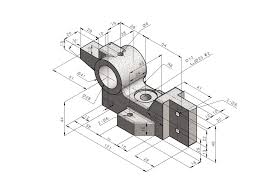
The foundations of mechanical drafting and design using AutoCAD software are covered in the **Mechanical AutoCAD – 2D + 3D syllabus**. Using drawing and editing tools, students learn how to produce precise 2D mechanical drawings of machine parts, components, and assemblies. Concepts of 3D modelling, such as building solid models, surfaces, and mechanical components, are also covered in the course. In order to prepare professional engineering drawings for manufacturing and design, learners acquire practical skills in dimensioning and annotation.
Introduction to CAD & Mechanical drafting
AutoCAD interface, toolbars & workspaces
Coordinate systems (Absolute, Relative, Polar)
Drawing setup: Units, limits, grid & snap
Basic draw commands: Line, Circle, Arc, Rectangle, Polygon
Modify commands: Move, Copy, Rotate, Scale, Trim, Extend, Offset
Object snap, Ortho & Polar tracking
Layer management (color, linetype, lineweight)
Mechanical drawing principles
BIS, ISO & ANSI standards
First angle & third angle projection
Types of lines used in machine drawings
Dimensioning rules & practices
Title block creation & sheet setup
Reading industrial mechanical drawings
Advanced modify commands
Blocks & Dynamic Blocks (standard fasteners)
External references (XREF)
Parametric drawing & constraints
Hatching & gradient techniques
Text styles & annotation scaling
Productivity tools & shortcuts
Linear, angular, radial & aligned dimensions
Limits, fits & tolerances
Geometric Dimensioning & Tolerancing (GD&T)
Surface finish symbols
Welding symbols
Leader notes & multileaders
Orthographic projections
Sectional views (Full, Half, Offset)
Auxiliary views
Assembly drawings
Part detailing with dimensions
Bill of Materials (BOM)
Shop drawings preparation
Nuts, bolts, screws & washers
Keys, couplings & bearings
Shafts, gears & pulleys
Springs, cams & valves
Flanges & pipe fittings
Introduction to sheet metal drawings
3D workspace & UCS
View controls & visual styles
Solid, surface & mesh modeling concepts
Creating primitives (Box, Cylinder, Cone, Sphere)
Extrude, Revolve, Sweep & Loft
Boolean operations (Union, Subtract, Intersect)
Fillet, Chamfer & shell in 3D
Editing solids & grips
Mechanical component modeling
Assembly modeling techniques
Exploded views
Section planes
Applying materials
Rendering basics
Interference checking
Model space vs Paper space
Viewports & scale management
Plot styles (CTB / STB)
Printing & exporting drawings (DWG, DXF, PDF)
2D shop drawing project
Mechanical component detailing project
Assembly drawing project
3D mechanical model project
Real-time industry-based practice
AutoCAD (Latest Version)
At Ameyya, we are passionate about education and its transformative impact. Get in touch with our expert counsellors to guide you on the right training to boost your career opprtunities.
Full-stack developers can expect career growth in the coming years, with some sources predicting a 13% increase in web developer jobs through 2026.
Financing is crucial for enabling business growth and personal investments by providing essential capital for expansion and development.
Civil, exterior and interior designing courses provide targeted knowledge and practical skills that align with job requirements in their respective fields.
The stock market has grown significantly, driven by technology and accessibility, reflecting economic resilience and attracting more investors, ultimately supporting greater financial literacy.
At Ameyya, we are passionate about education and its transformative impact.
Get in touch with our expert counsellors to guide you on the right training to boost your career opportunities.